
NIOS Class 12 Computer Science Chapter 4 Operating System Solutions English Medium As Per New Syllabus. to each chapter is provided in the list so that you can easily browse throughout different chapters NIOS Class 12 Computer Science Chapter 4 Operating System Notes and select need one. NIOS Class 12 Computer Science Question Answers Download PDF. NIOS Study Material of Class 12 Computer Science Notes Paper 330.
NIOS Class 12 Computer Science Chapter 4 Operating System
Also, you can read the NIOS book online in these sections Solutions by Expert Teachers as per National Institute of Open Schooling (NIOS) Book guidelines. These solutions are part of NIOS All Subject Solutions. Here we have given NIOS Class 12 Computer Science Textbook Solutions, NIOS Senior Secondary Course Computer Science Notes for All Chapter, You can practice these here.
Operating System
Chapter: 4
| Module – 1: Basic Computing |
INTEXT QUESTIONS 4.1
I. Choose the appropriate answer.
1. What is an Operating system?
(a) Collection of programs that manages hardware resources.
(b) System service provider to the application programs.
(c) Link to interface the hardware and application programs.
(d) All of the above.
Ans: (d) All of the above.
2. Process is ____________:
(a) Program in high-level language kept on disk.
(b) A program in execution.
(c) Contents of main memory.
(d) A job in secondary memory.
(e) None of the above.
Ans: (b) A program in execution.
3. An ____________ is an intermediary between users and computer hardware.
(a) Operating environment.
(b) Operating System.
(c) System Software.
(d) None.
Ans: (b) Operating System.
II. Fill in the blanks.
1. ____________ and ____________ are two types of user interfaces.
Ans: GUI and CUI .
2. ____________ , ____________ , ____________ , ____________ are all the resources managed by operating system.
Ans: Memory, file, input/output, process.
3. ____________ is an example of GUI based OS.
Ans: Windows.
INTEXT QUESTIONS 4.2
Fill in the blanks.
1. ____________, ____________, ____________ are some of the smartphone operating systems.
Ans: Android, iOS, Windows.
2. ____________ operating system is developed by Microsoft.
Ans: Windows.
3. Linux is an ____________ operating system.
Ans: Open Source.
4. ___________ and ___________ are widely used as server operating system.
Ans: Linux and Unix.
5. ___________ is the latest version of Windows.
Ans: Windows 10.
6. Software programs developed for smartphones that can carryout specific functions are called as ___________ .
Ans: Apps(application).
7. ___________ is an open source mobile OS and is developed by ___________.
Ans: Android, Google.
TERMINAL EXERCISE
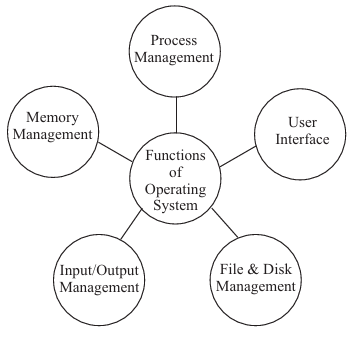
1. State all the important functions of operating system. Explain with the help of diagrams.
Ans: The function of operating system are:
2. Explain all the functions of operating system.
Ans: (i) Process Management: We know that a program is a set of logical instructions given to the computer. A program that is in an execution state is called a process. For example, a word processing program like MS-Word being run by a user on a personal computer is a process. A system task, such as sending output to a printer, can also be a process.
(ii) Memory Management: A computer program remains in main (RAM) memory during its execution. To improve CPU usage several processes are being executed simultaneously in the memory. The OS keeps track of every memory location, that is either assigned to some process or is free. It also checks how much memory should be assigned to each process.
(iii) Input/Output Management: Humans interact with machines by providing information through input output devices. Management of input/output (I/O) devices is one of the most important functions of an operating system. A few examples of the variety of input/output devices on a modern computer are- mouse, keyboards, disk drives, USB devices, I/O, printers, special devices for the physically challenged, etc. Operating system provides a generic, consistent, convenient and reliable way to access I/O devices.
(iv) File and Disk Management: Computer systems have secondary storage devices like magnetic disk, magnetic tape, optical media, flash drives, etc. for permanent storage of programs and data. The programs and the user data are stored in files. In general, a file is a sequence of bits, bytes, lines or records. The operating system is responsible for allocating space for files on secondary storage media. A file, especially a large file, may or may not be stored in a contiguous location on a physical disk drive. If the file is of large size, it is fragmented into smaller pieces. The OS then keeps track of the memory location allocated to each piece of the file on the storage disk.
(v) User Interface: A User Interface (UI) is the part of an operating system, program or device that the user uses to input and receive data. A Text User Interface (TUI) or Command Line Interface (CLI) allows users to interact with an operating system by typing commands in a terminal or console window. The users type a command or series of commands for each task they want to perform on a visual prompt. Examples of command line based operating systems are DOS (Disk Operating System), and UNIX etc.
Subject Ka Complete Video Solution Dekhein
Step-by-step easy concept explanation aur full questions Answer ke liye watch karein ya app download karein:

 Buy Now