
NIOS Class 12 Accountancy Chapter 13 Computer and Computerised Accounting System Solutions English Medium As Per New Syllabus. to each chapter is provided in the list so that you can easily browse throughout different chapters NIOS Class 12 Accountancy Chapter 13 Computer and Computerised Accounting System Notes and select need one. NIOS Class 12 Accountancy Chapter 13 Computer and Computerised Accounting System Question Answers Download PDF. NIOS Study Material of Class 12 Accountancy Paper Code: 320.
NIOS Class 12 Accountancy Chapter 13 Computer and Computerised Accounting System
Also, you can read the NIOS book online in these sections Solutions by Expert Teachers as per National Institute of Open Schooling (NIOS) Book guidelines. These solutions are part of NIOS All Subject Solutions. Here we have given NIOS Class 12 Accountancy Solutions English Medium, NIOS Senior Secondary Course Accountancy Notes in English Medium for All Chapter, You can practice these here.
Computer and Computerised Accounting System
Chapter: 13
| Module – 2: Trial Balance and Computers |
INTEXT QUESTIONS 13.1
Fill in the blanks with correct word/words
(i) Computer is a fast data _________ electronic machine.
Ans: Processing.
(ii) All the computer operations are caused by ________ pulses and travels at the speed of light.
Ans: Electrical.
(iii) A computer is free from ________ and lack of concentration.
Ans: Tiredness.
(iv) Computers are being used as powerful ________ tools.
Ans: Communication.
(v) The mostly used input devices are keyboard, _________ and scanner.
Ans: Mouse.
(vi) Central Processing Unit is to computer, as the _________ is to human body.
Ans: Brain.
(vii) The commonly used output devices include _________ printer etc.
Ans: Monitor.
INTEXT QUESTIONS 13.2
Fill in the blanks with correct word/words
(i) Computer hardware and __________ need to be updated from time to time.
Ans: Software.
(ii) The _________ cannot make a decision itself like human beings.
Ans: Computer.
(iii) _________ requires a neat, clean and controlled temperature to work efficiently.
Ans: Computer.
(iv) The most popular system of recording of accounting transactions is _________.
Ans: Manual.
(v) The computerised accounting uses the concept of ___________.
Ans: Databases.
(vi) Accounting __________ is used to implement a computerised accounting.
Ans: Software.
INTEXT QUESTIONS 13.3
Fill in the blanks with correct word/words
(i) In a manual accounting system, transactions recorded in the books of ___________.
Ans: Original Entry.
(ii) The generation of ledger accounts is not a necessary condition for making __________ in a computerised accounting system.
Ans: Trial Balance.
(iii) The computerised accounting system is capable of handling ___________ of transactions.
Ans: Large Number.
(iv) The ___________ accounting system is capable of offering quick and quality reporting.
Ans: Computerised.
(v) Computerised accounting system offers ___________ facility to store transaction data.
Ans: Online.
(vi) Computerised accounting system is __________ to the manual accounting system.
Ans: Superior.
(vii) The computerised accounting is one of the _________ oriented applications.
Ans: Database.
II. Give any two advantages & two limitations of Computerised Accounting System.
Ans: Advantages:
(i) Accuracy And Speed.
(ii) Reliability.
Limitations:
(i) High Cost Of Installation.
(ii) High Cost Of Training.
III. Define Management Information System.
Ans: Management Information System Is A System That Collects, Processes, Stores And Provides Information To Managers For Decision Making.
| TERMINAL EXERCISE |
1. State the meaning and characteristics of Computer.
Ans: Computer is an electronic device that can perform a variety of operations in accordance with a set of instructions called programme. It is a fast data processing electronic machine. It can provide solutions to all complicated situations. It accepts data from the user, converts the data into information and gives the desired result. Therefore, we may define computer as a device that transforms data into information. Data can be anything like marks obtained in various subjects. It can also be name, age, sex, weight, height, etc. of all the students, savings, investments, etc., of a country. Computer is defined in terms of its functions.
Characteristics of Computer A Computer is better than human being. It possesses some characteristics.
These are as follows:
(i) Speed: It can access and process data millions times faster than humans can. It can store data and information in its memory, process them and produce the desired results. It is used essentially as a data processor. All the computer operations are caused by electrical pulses and travels at the speed of light. Most of the modern computers are capable of performing 100 million calculations per second.
(ii) Storage: Computers have very large storage capacity. They have the capability of storing vast amount of data or information. Computers have huge capacity to store data in a very small physical space. Apart from storing information, today’s computers are also capable of storing pictures and sound in digital form.
(iii) Accuracy: The accuracy of computer is very high and every calculation is performed with the same accuracy. Errors occur because of human beings rather than technological weakness; main sources of errors are wrong program by the user or inaccurate data.
(iv) Diligence: A computer is free from tiredness and lack of concentration. Even if it has to do 10 million calculations, it will do even the last one with the same accuracy and speed as the first.
(v) Versatility: Computer can perform wide range of jobs with speed, accuracy, and diligence. In any organisation, often it is the same computer that is used for diverse purposes such as accounting, playing games, preparing electric bills, sending e-mail and so on.
(vi) Communication: Computers are being used as powerful communication tools. All the computers within an office are connected by cable and it is possible to communicate with others in the office through the network of computer.
(vii) Processing Power: Computer has come a long way today. They began as mere prototypes at research laboratories and went on to help the business organisations,and today, their reach is so extensive that they are used almost everywhere. In the course of this evolution, they have become faster, smaller, cheaper, more reliable and user friendly.
2. Explain the components of the computer.
Ans: A computer consists of the major components i.e., Input Unit, Central Processing Unit and Output Unit.
Diagrammatically, these components may be presented as follows:
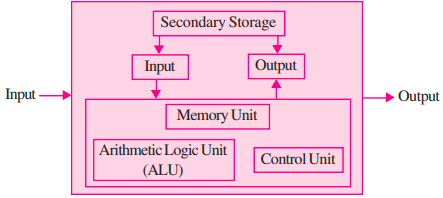
(i) Input Unit: Input unit is controlling the various input devices which are used for entering data into the computer. The mostly used input devices are keyboard, mouse, and scanner. Other such devices are magnetic tape, magnetic disk, light pen, bar code reader, smart card reader, etc. Besides, there are other devices which respond to voice and physical touch. Physical touch system is installed at airport for obtaining the online information about departure and arrival of flight. The input unit is responsible for taking input and converting it into binary system.
(ii) Central Processing Unit (CPU): The CPU is the control centre for a computer. It guides, directs and governs its performance. It is the brain of the computer. The main unit inside the computer is the Central Processing Unit. Central Processing Unit is to computer as the brain is to human body. This is used to store program, photos, graphics, and data and obey the instructions in program.
It is divided into three subunits:
(a) Control Unit: Control unit controls and co-ordinates the activities of all the components of the computer. This unit accepts input data and converts it into computer binary system.
(b) Memory Unit: This unit stores data before being actually processed. The data so stored is accessed and processed according to instructions which are also stored in the memory section of computer well before such data is transmitted to the memory from input devices.
(c) Arithmetic and Logic Unit: It is responsible for performing all the arithmetical calculations and computations such as addition, subtraction, division, and multiplication. It also performs logical functions involving comparisons among variable and data items.
(iii) Output Unit: After processing the data, it ensures the convertibility of output into human readable form that is understandable by the user. The commonly used output devices include monitor also called Visual Display Unit, printer etc.
3. Explain the limitations of a Computer.
Ans: The limitations of computer are depending upon the operating environment they work in.
These limitations are given below as :
(i) Cost of Installation: Computer hardware and software needs to be updated from time to time with availability of new versions. As a result heavy cost is incurred to purchase a new hardware and software from time to time.
(ii) Cost of Training: To ensure efficient use of computer in accounting, new versions of hardware and software are introduced. This requires training and cost is incurred to train the staff personnel. z Self Decision Making : The computer cannot make a decision like human beings. It is to be guided by the user.
(iii) Maintenance: Computer requires to be maintained properly to help maintain its efficiency. It requires a neat, clean and controlled temperature to work efficiently.
(iv) Dangers for Health: Extensive use of computer may lead to many health problems such as muscular pain, eyestrain, and backache, etc. This affects adversely the working efficiency and increasing medical expenditure.
4. Explain the role of Computers in Accounting.
Ans: Computers play an important role in modern accounting by making the process faster, accurate, and efficient.
The main roles are:
(i) Preparation of Accounting Documents: Computers help in preparing documents like cash memos, bills, invoices, and vouchers quickly and accurately.
(ii) Recording of Transactions: Business transactions are recorded using accounting software. Each account and transaction is given a unique code, which makes classification and recording easy and systematic.
(iii) Automatic Posting to Ledger: Once transactions are entered, they are automatically posted to respective ledger accounts without manual effort.
(iv) Preparation of Trial Balance and Financial Statements: Computers automatically generate Trial Balance to check accuracy. They also help in preparing Trading Account, Profit & Loss Account, and Balance Sheet.
(v) Data Storage and Retrieval: Large amounts of accounting data can be stored safely in computers and can be retrieved easily whenever required.
(vi) Speed and Accuracy: Computers perform calculations quickly and reduce chances of human errors.
(vii) Real-Time Information: Accounting data is updated instantly, which helps management in quick decision-making.
5. Differentiate between Manual accounting and Computerised accounting system.
Ans: Difference between Manual Accounting and Computerised Accounting are as follow:
| Point of Difference | Manual Accounting | Computerised Accounting |
| 1. Recording | Recording of financial transactions is through books of original entry. | Data content of these transactions is stored in a well-designed database. |
| 2. Classification | Transactions recorded in books of original entry are further classified by posting them into ledger accounts. This results in transaction data duplicity. | No such data duplication is made. Stored transaction data is processed to appear as classified so that the same is presented in report form. |
| 3. Summarising | Transactions are summarised to produce trial balance by ascertaining the balances of various accounts. | The generation of ledger accounts is not a necessary condition for preparing the trial balance. |
| 4. Adjusting Entries | Adjusting entries are made to adhere to the principle of matching. | There is no need for making adjusting entries for errors and rectifications. |
| 5. Financial Statements | Preparation of financial statements assumes the availability of trial balance. | Preparation of financial statements is independent of producing the trial balance. |
6. Enumerate the basic requirements of any computerised accounting system.
Ans: (i) Accounting Framework: It is the application environment of the system which includes proper accounting principles, coding, and grouping structure. A sound framework is essential for accurate accounting.
(ii) Operating Procedure: A well-designed operating procedure suitable to the organisation is required for smooth functioning of the computerised accounting system.
(iii) Database Management: The system should store data in a well-organised database for easy access, updating, and retrieval of information.
(iv) User Interface: A simple and user-friendly interface is needed for entering data, processing transactions, and generating reports.
(v) Reporting System: The system should be capable of generating various reports like ledger accounts, trial balance, and financial statements efficiently.
7. Explain the components of Computerised Accounting Software.
Ans: Components of Computerised Accounting Software:
(i) Preparation of Accounting Documents: Computer helps in preparing accounting documents like cash memos, bills, invoices, and vouchers quickly and accurately.
(ii) Recording of Transactions: All business transactions are recorded in the software. Each account and transaction is assigned a unique code, which makes classification easy and systematic.
(iii) Preparation of Trial Balance and Financial Statements: After recording, transactions are automatically posted to ledger accounts. The computer prepares the Trial Balance and also generates financial statements like Trading Account, Profit & Loss Account, and Balance Sheet.
Subject Ka Complete Video Solution Dekhein
Step-by-step easy concept explanation aur full questions Answer ke liye watch karein ya app download karein:

 Buy Now