
SEBA Class 6 Computer Chapter 4 Tools of ICT Solutions As Per New Syllabus. to each chapter is provided in the list so that you can easily browse through different chapters SEBA Class 6 Computer Chapter 4 Tools of ICT Notes and select need one. SEBA Class 6 Computer Chapter 4 Tools of ICT Question Answers Download PDF. SCERT Class 6 Computer Textbook Solutions.
SEBA Class 6 Computer Chapter 4 Tools of ICT
Also, you can read the SCERT book online in these sections Solutions by Expert Teachers as per State Council of Educational Research and Training (SCERT) Book guidelines. SCERT Class 6 Computer Textual Solutions are part of All Subject Solutions. Here we have given SCERT Class 6 Computer Question Answer for All Chapters, You can practice these here.
Tools of ICT
Chapter: 4
| Learning Outcomes |
| PAGE NO: 21 |
1. Identify the hardware and software tools.
Ans: Hardware Tools (Things you can touch):
Input devices – Keyboard, Mouse, Scanner.
Output devices – Monitor, Printer, Speaker’s.
Storage devices – Hard Disk, USB, CD/DVD.
Processing devices – CPU, RAM.
Other devices – Webcam, Joystick.
Software Tools (Programs you use):
System software – Operating System (Windows, Linux), Antivirus.
Application software – MS Word, MS Excel, Web Browser, Paint.
Programming tools – Code Editors, IDE (for making programs).
2. Recognizes the uses of hardware and software tools.
Ans: The student can identify different hardware and software tools and understands how they are used in daily life for tasks such as typing, drawing, learning, and entertainment.
3. Differentiate between hardware and software tools.
Ans: Hardware Tools:
(i) Hardware tools are the parts of a computer.
(ii) They can be seen and touched.
(iii) Examples: keyboard, mouse, monitor, CPU.
Software Tools:
(i) Software tools are computer programs.
(ii) They cannot be seen or touched.
(iii) They help us do different tasks on a computer.
(iv) Examples: Word, Paint, Calculator, games.
4. Narrate the uses of ICT.
Ans: ICT is used in many parts of our daily life. We use ICT to talk to people using mobile phones and video calls. It helps students learn through online classes and learning apps. Offices use ICT to do work faster and store information. Hospitals use ICT to keep patient records. Banks use ICT for ATM and online services. ICT is also used for fun, like watching videos, listening to music, and playing games.
5. Describe the web browser and the Internet.
Ans: Web Browser: A web browser is a software tool that helps us access and explore the World Wide Web (WWW). Some popular web browsers are Google Chrome, Microsoft Edge, Mozilla Firefox, and Safari.
Internet: The Internet is a global network that connects millions of computers and devices worldwide. It allows users to access information, watch videos, play games, communicate with friends and family, and use various online services through web browsers on computers, tablets, and mobile phones. The Internet has become an important part of our daily lives.
| EXERCISE |
1. Have you ever seen this screen on a computer or mobile? Write a few lines about it in the box below with the help of your teachers and guardians.
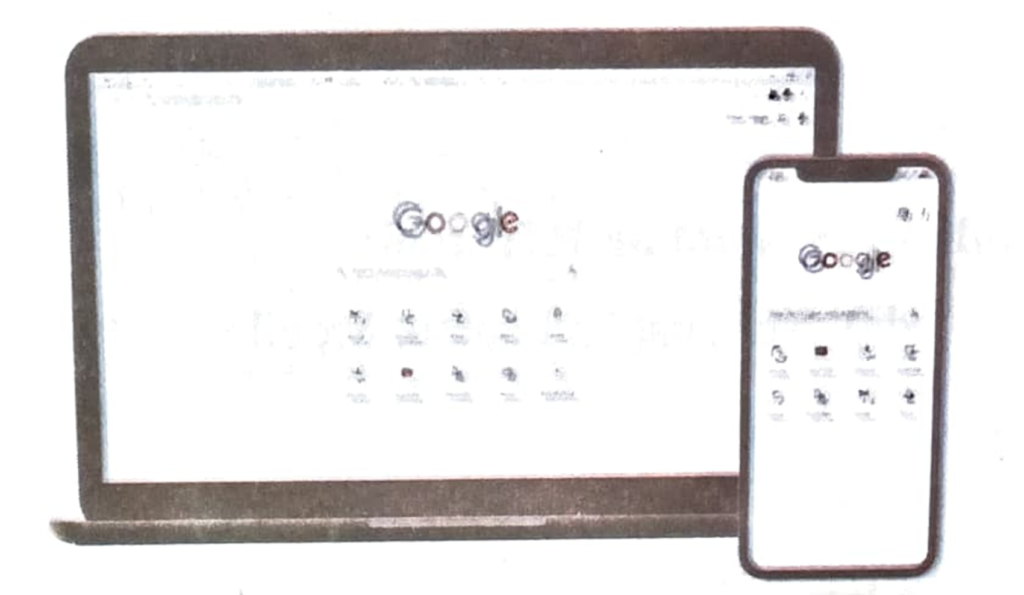
Ans: Yes, I have seen this screen on a computer and mobile phone. It is the Google Search page. We use Google to search for information, images, videos, news, and websites on the internet. It helps us find answers to our questions quickly and easily. Google is one of the most popular search engines in the world.
2. Write down the names of ICT tools that you find in your surroundings.
| Write here: |
Ans: Computer, Laptop, Mobile Phone, Television, Radio, Printer, Tablet, and Projector are ICT tools that I find in my surroundings.
3. Fill in the blanks:
(a) Laptop is a portable _____________ .
Ans: Computer.
(b) Radio is a ____________ tool.
Ans: Communication.
(c) Paint is ____________ tool.
Ans: Software.
(d) ____________ processor is used for writing.
Ans: Word.
(e) _____________ is used to explore online world.
Ans: Web browser.
4. Which of the following is not an ICT tool:
Radio, Newspaper, Laptop, Mobile.
Ans: Newspaper.
5. What is the difference between a smart TV and a normal television? Write with the help of your teachers.
Ans:
| Smart TV | Normal television |
| Can connect to the Internet | Used to only watch TV channels |
| Used to watch online videos | Doesn’t used the internet |
| Can use apps like YouTube | Cannot use apps |
Subject Ka Complete Video Solution Dekhein
Step-by-step easy concept explanation aur full questions Answer ke liye watch karein ya app download karein:
 Buy Now